Your Tesla has two batteries. Everyone knows the big one — the high-voltage pack behind your range. Almost nobody thinks about the small 12V battery that powers everything else: the computers, the door latches, the lights, and the contactors that connect the main pack to the drive system.
When the 12V dies, your Tesla becomes an expensive paperweight. The doors may not open. The screen won’t turn on. And the main battery — fully charged — sits there useless, because the contactors can’t close without 12V power. It strands more Teslas than the big pack ever will, and Tesla shows you none of its health.
Here’s how to catch it before it catches you — including what 17 days of my own 2017 Model X’s 12V data actually looks like, so you know what “healthy” is.
Warning Sign #1: Random Error Messages
The first symptom is usually a cluster of seemingly unrelated errors on the touchscreen:
- “12V battery needs service” (the obvious one — but Tesla doesn’t always show it)
- “Cruise control unavailable”
- “Regenerative braking limited”
- “Power reduced”
These appear because the 12V battery can no longer hold a stable voltage for the car’s dozens of electronic modules. Each module reads the dip as its own fault.
Warning Sign #2: Sluggish or Delayed Screen Boot
When you get in, the touchscreen should wake almost instantly. If it takes 5–10 seconds, or lingers on a black screen with the Tesla logo, the 12V may be struggling to supply enough current during boot.
Warning Sign #3: Phantom Drain Gets Worse
A degrading 12V battery can’t hold charge, so the car keeps waking its DC-DC converter to top it back up, pulling energy from the main pack to do it. You see it as increased overnight range loss.
This one is worth looking at with real numbers, because the overhead is bigger than most people expect. Here’s where the 12V energy on my car actually went over the baseline:
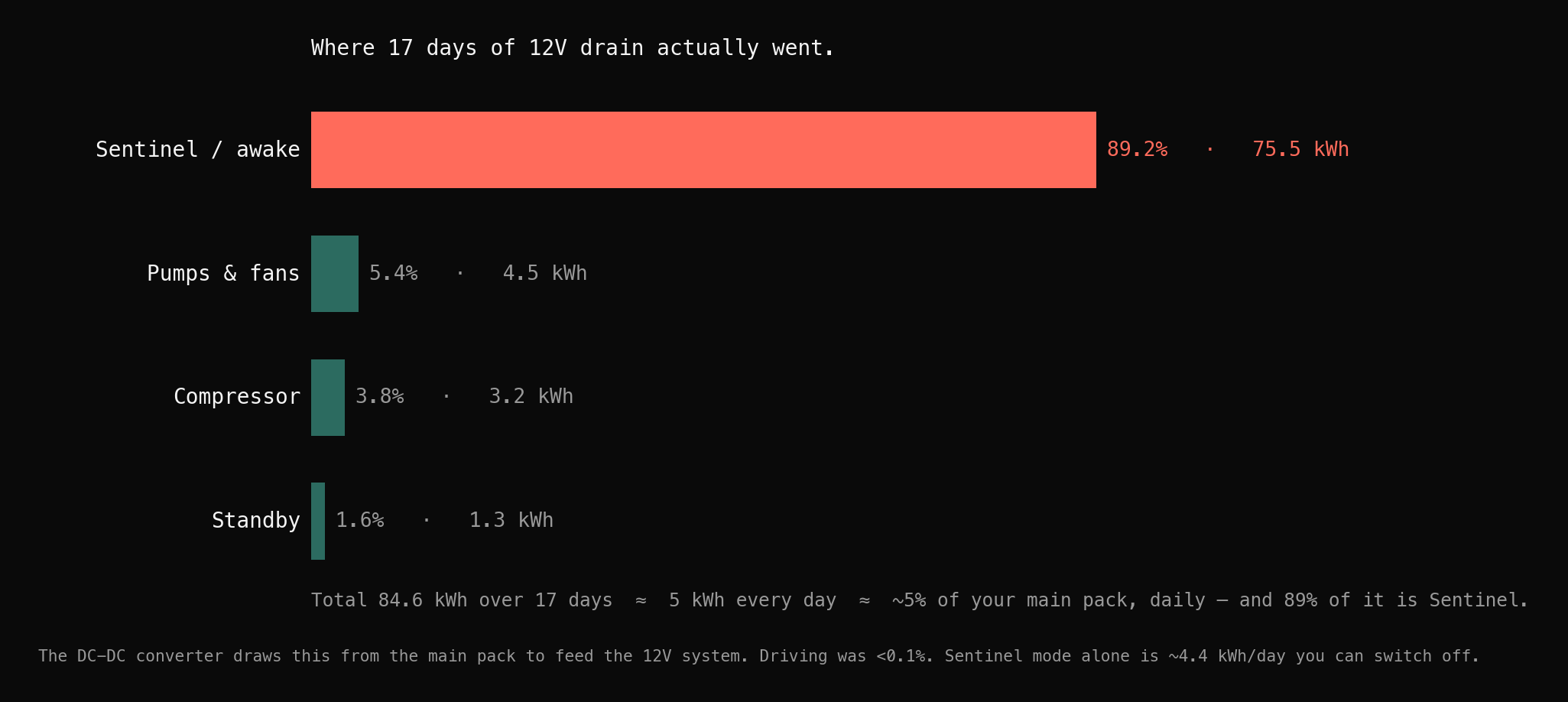
If your overnight drain is climbing and you haven’t changed your Sentinel habits, the 12V battery is a prime suspect.
Warning Sign #4: Door Handles or Trunk Behave Erratically
On Model S/X, the door handles are motorized off the 12V system. If they’re slow to present, occasionally unresponsive, or making unusual noises, low 12V voltage is a likely cause.
Warning Sign #5: The Car “Bricks” Overnight
Worst case: you walk up and nothing works. The key card is dead, the handles don’t move, the app says the car is offline. The 12V has dropped below the voltage the computers need to stay alive — and once it’s there, you’re waiting on a tow.
What a healthy 12V actually looks like
Tesla gives you no window into any of this, so I built one. Here’s the part that matters, measured on my own 2017 Model X 100D over a 17-day baseline.
The single most useful number is the resting (sleep) voltage — the reading when the car is asleep and the DC-DC converter isn’t charging the battery. That’s the only time you’re seeing the battery itself. Here’s why that distinction matters:
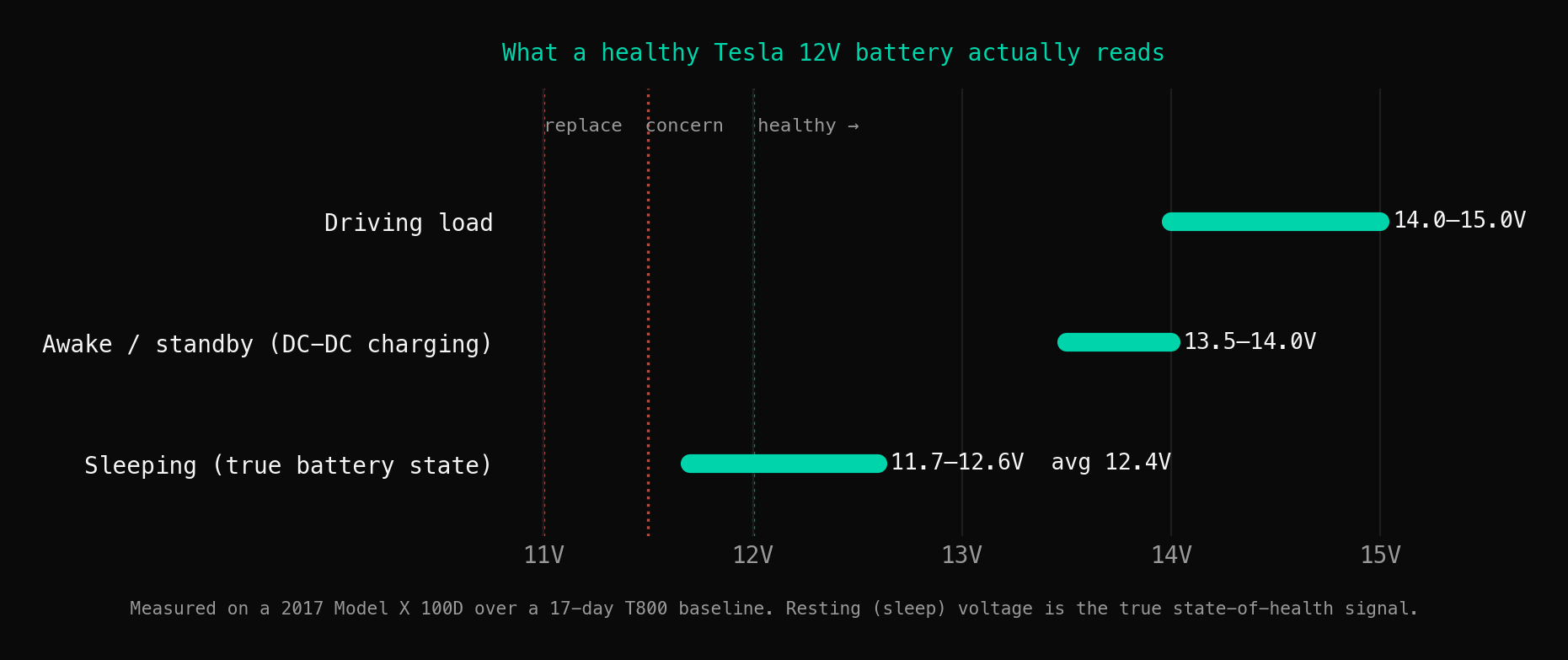
Measure at the wrong moment and a dying battery looks perfectly healthy. So the number to track over time is the resting voltage, and here’s mine across the baseline:
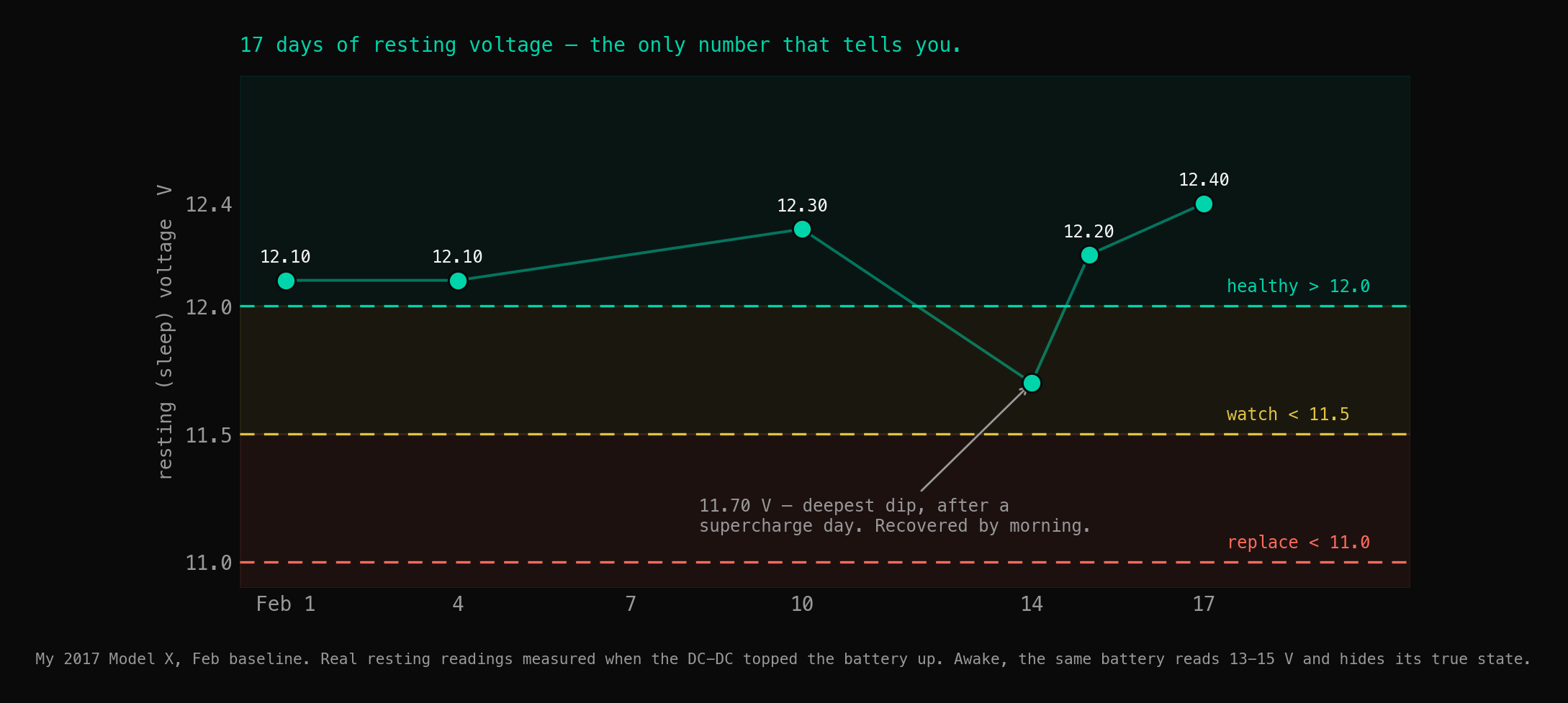
Two more things the data showed that tell you the system is healthy:
- The battery bounces back fast. Across the baseline, when voltage dipped and the DC-DC kicked in, it restored the battery in a median of about 30 seconds (range 20–60s). Quick recovery means low internal resistance — a healthy battery. A tired one takes longer and longer to come back.
- A healthy battery holds its resting voltage flat. No downward trend over 17 days. That flatness is the health signal; the day it starts sliding is the day the clock starts.
That’s the whole game: not catching the dip you can already feel, but seeing the resting voltage begin to trend down weeks before the car bricks in a parking lot.
How to check yours
Option 1 — Manual voltage check. Open the frunk, find the 12V battery, measure with a multimeter at rest (not right after driving). Healthy is ~12.4–12.8V at full rest; below 12.0V is concerning; below 11.5V means replacement is overdue. Downside: you have to remember, and most people don’t until it’s too late.
Option 2 — OBD monitoring. A Bluetooth OBD adapter on the diagnostic port can read 12V voltage live. Paired with logging software, you can track the resting-voltage trend over weeks — which, as the chart above shows, is the reading that actually predicts failure.
Option 3 — Continuous monitoring (T800). T800 reads 12V voltage as part of its standard suite and watches the resting-voltage trend for you, so a decline surfaces weeks before failure instead of as a dead car. The live garage shows the current readings from my own car.
When to replace
Don’t wait for the “12V battery needs service” warning — by the time Tesla shows it, you may have days or hours. Replace proactively when:
- The battery is over 3 years old (lead-acid)
- Resting voltage consistently reads below 12.2V, or is trending down month over month
- You’re seeing any of the warning signs above
The cost
- Lead-acid battery: $80–120 for the part, plus labor if you don’t DIY
- Tesla Service Center: $200–350 including labor
- Being stranded: tow truck + missed plans + a dead car in a parking garage
Proactive replacement is always cheaper than the emergency kind. The only hard part is knowing — and that’s a data problem, not a mechanical one.
This runs on my actual car. How the monitor works covers the full signal stack; the live garage shows current readings, and the battery health check guide covers every metric the app hides. If you’re shopping used, the 12V battery’s age and resting voltage are quick wins on a pre-purchase inspection. And the broader range-loss picture is in Tesla phantom drain: causes & fixes.