You wake up, check your Tesla app, and your car lost 8 miles of range overnight. It was parked in your garage, plugged in to nothing, doing… what exactly?
This is phantom drain — one of the most common Tesla owner complaints. Here’s what’s actually happening, how to diagnose it, and a measured example from our own car that shows why the app can’t be trusted to tell you.
What Is Phantom Drain?
Phantom drain (also called vampire drain) is the gradual loss of battery charge when your Tesla is parked and not in use. Every Tesla experiences some level of it — the car’s computers never fully shut down. But “normal” is 1–3 miles per day. Anything beyond that deserves investigation.
The Top Causes
1. Sentry Mode
Impact: 5–10 miles/day
Sentry Mode keeps your cameras active 24/7, recording any motion near the car. It’s the single biggest phantom drain contributor. If you park in a secure garage, consider turning it off at home.
2. Tesla App Polling
Impact: 2–5 miles/day
Every time you open the Tesla app (or it refreshes in the background), the car wakes up. Third-party apps like TeslaFi, TeslaMate, or Stats are even worse — they poll your car every few minutes, preventing it from sleeping.
3. Cabin Overheat Protection
Impact: 2–8 miles/day (in warm climates)
This feature runs the AC to keep the cabin below 105°F when parked. Essential in Arizona, unnecessary in Minnesota in January.
4. Summon Standby
Impact: 1–2 miles/day
If Smart Summon Standby is enabled, the car keeps its sensors warm and ready. Most owners use Summon rarely enough that standby isn’t worth the drain.
5. Software Bugs
Occasionally, a Tesla software update introduces a regression that increases standby power consumption. These are usually patched within a few weeks, but they can cause significant drain in the meantime.
6. 12V Battery Degradation
A failing 12V battery can cause the car’s computers to behave erratically, including failing to enter proper sleep mode. This is a sneaky one — the car doesn’t always warn you until the 12V is nearly dead.
How to Diagnose
The Simple Test
- Charge to any SOC level and note the exact percentage
- Disable Sentry Mode, Cabin Overheat Protection, and Summon Standby
- Close the Tesla app completely (force-quit, don’t just minimize)
- Don’t open the app for 12 hours
- Check the SOC — you should lose less than 1%
If you still see significant drain after eliminating the known causes, you may have a hardware issue.
The T800 Approach
T800 monitors your vehicle’s power consumption continuously while parked. Instead of a single test, you get weeks of data showing:
- Exact energy consumption per hour while parked
- Correlation with Sentry Mode on/off periods
- 12V battery voltage trends (early warning of failure)
- Wake events (what’s waking your car and when)
This turns guesswork into data.
A measured case study: our own car doesn’t sleep
We run this on our own 2017 Model X 100D, and it’s a live phantom-drain case — an honest one, because the car has a real problem we can see and the owner couldn’t.
Over 269 days of logging, the car recorded zero sleep cycles on 254 of them. The most recent uninterrupted run is 140 days without a single sleep event. While “parked,” it draws a median of 187 W continuously (ranging 123–430 W depending on what’s active) — that’s about 4.5 kWh a day, or roughly 15 miles of range, bled off doing nothing.
Nothing in the Tesla app surfaces this. The app shows a state of charge; it can’t show you that the car never went quiet, because opening the app to check is itself one of the things keeping it awake. Continuous logging off the OBD port is the only way we found out — and a median 187 W baseline is now the reference we’d measure any fix against. That’s the difference between “my car feels like it drains a lot” and a number you can act on.
Practical Fixes
- Create a “Home” location profile — Disable Sentry Mode automatically when parked at home
- Limit third-party app polling — Use TeslaMate’s sleep detection or set polling intervals to 15+ minutes
- Disable Cabin Overheat Protection when parked in a garage
- Turn off Summon Standby unless you use it daily
- Keep your software updated — Tesla patches drain bugs regularly
- Monitor your 12V battery — replace it proactively if the resting-voltage trend drifts down; the 12V warning signs show up in the data well before a no-start
What’s Normal?
| Configuration | Expected Drain |
|---|---|
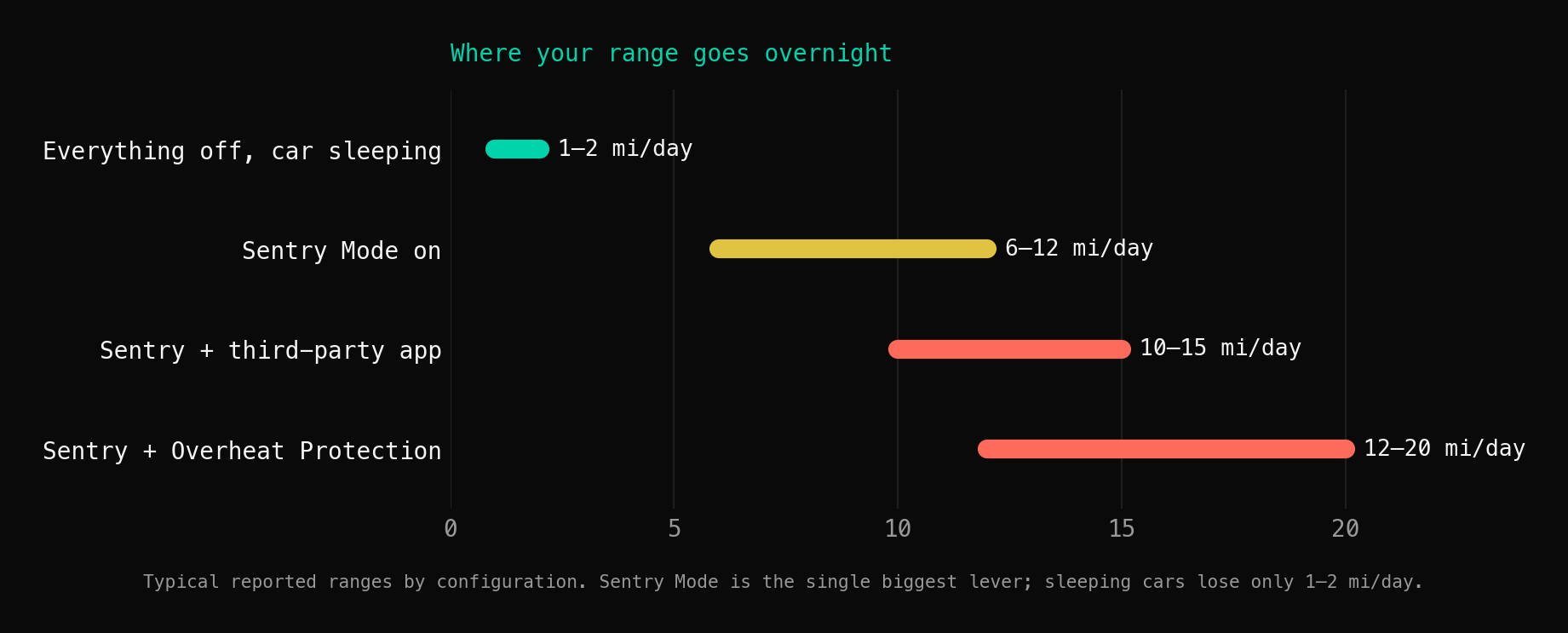
| Everything off, car sleeping | 1–2 miles/day |
| Sentry Mode on | 6–12 miles/day |
| Sentry + third-party app | 10–15 miles/day |
| Sentry + Overheat Protection | 12–20 miles/day |
If your numbers are significantly higher than these ranges, something else is going on.
The Bottom Line
Phantom drain is manageable once you understand the causes. For most owners, disabling Sentry Mode at home and limiting app polling solves 90% of the problem. For the remaining 10% — or if you want ongoing monitoring without manual tests — a dedicated monitoring solution like T800 gives you continuous visibility.
Tired of guessing? T800 monitors phantom drain automatically so you always know where your energy is going.